Now: What good will it do me?
TD
Posted 23 February 2010 - 01:23 PM
Posted 25 February 2010 - 12:56 PM
Posted 08 March 2010 - 05:42 PM
Posted 08 March 2010 - 06:27 PM
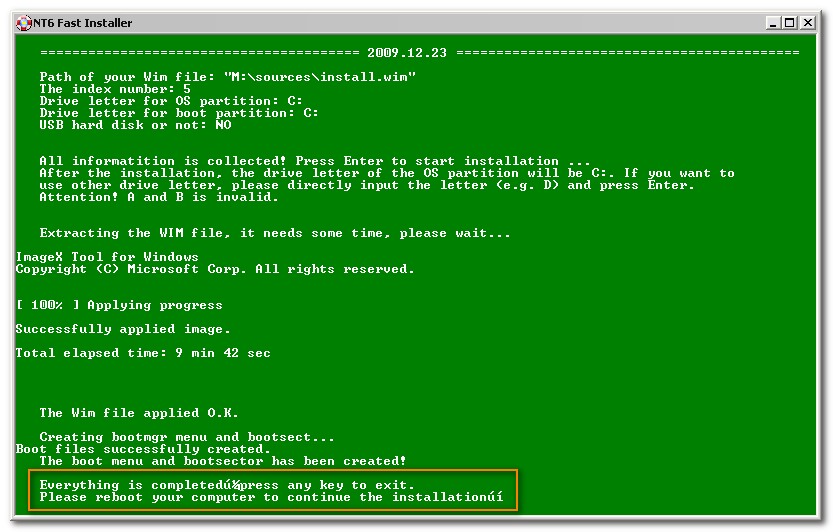
I've got a Dell 690 and I'm using a NESO 500GB USB hard drive. Everything works when running installer.cmd from withing WinXP.
When I boot from the USB drive, Windows 7 starts but part way through may machine reboots.You can see "Windows" and the logo but after a minute or so, it reboots. If I take this USB drive to a Windows 7 machine, the drive shows up as a "local disk" but is unreadable. Windows 7 gives an error.
Any idea what could be happening here?
Thanks
Posted 08 March 2010 - 07:06 PM
Posted 09 March 2010 - 12:54 AM
The bcdboot v7000 is used to be compatible with xp based winpe. If you use other OS to run the installer, you can use bcdboot v7600The other potential problem is that I don't have the Beta v7000 of the bcdboot.exe file. I'm using the v7600 one. I don't know if this is significant or not. If someone could upload one, I can try with this.
Posted 09 March 2010 - 03:36 PM
Posted 10 March 2010 - 12:04 AM
Thanks for the reply.
I'm running the installed from withing WinXP SP3. Is it a problem that I'm using v7600 for bcdboot.exe?
What if I went to a Windows 7 machine and tried to run the installer from there. That will have bcdboot.exe v7600.
Any idea's as to what could be happening when I boot from the USB? Because it appears to boot and the windows logo appears. Up to this point, you can see the USB drive is working. I then notice that the USB drive stops and after a while, my machine reboots.
Thanks
Posted 10 March 2010 - 12:39 AM
Posted 10 March 2010 - 01:40 AM
Posted 10 March 2010 - 02:45 AM
Posted 10 March 2010 - 04:29 AM
Send me your email in the message, I can give you bcdboot 7000.Thanks for the info.
I managed to get it solved. When I ran the Win7 set-up, I had the SAS/SATA controllers on my machine switched on. When it rebooted, I switched them off through the BIOS. I think that perhaps got set-up confusd. Anyway, I switched them on and it booted fine into Windows 7. I can see it running from the USB device.
It would be useful to get hold of the bcdboot v7000 so that I can run the installer from WinXP.
Thanks
Posted 10 March 2010 - 04:44 AM
Send me your email in the message, I can give you bcdboot 7000.
Posted 11 March 2010 - 03:23 AM
Posted 12 March 2010 - 07:34 AM
Posted 12 March 2010 - 03:15 PM
Fwiw, I don't need the additional partition and Win7 installs from LiveXP (using the installer from any boot media) without issue on machines I've tested. These are older machines with PATA drives and 'standard' hardware. I know nothing of 64bit and it's possible drivers for your newish hardware are required. Have you tried repair options from Win7 boot DVD?i am trying to install windows 7 64bit ultimate to my local C: drive. But when I use this tool it doesnt seem to work as after restarting windows will BSOD or sometimes it said "windows cannot be configured on your computer's hardware" or something similar.
can you suggest what I am doing wrong? is this meant only for USB?
I am using a LiveXP/BartPE as the environment to run the script from.
i am formatting my disk as one NTFS primary partition as C:
I know in normal installations there is another partition of 100mb. is this why its not working for me? i need to create 2 partitions?
Posted 15 March 2010 - 11:45 AM
Posted 15 March 2010 - 08:59 PM
This all works great. I have installed both x32 and x64 to a USB flash drive and it is a really valuable tool for running system repairs and recovery. I was looking at the drive letter batch file and after some examination it appears that it only modifies the drive letter in the mounted devices section of the registry. None the less it is a pretty sophisticated command file with thorough error checking. I was wondering if there is anything around that would process a system drive in similar fashion, but would replace all occurrences of the current drive letter with a new drive letter. I have run into situations where for various reasons the operating system was installed on D: or E: because it was a second OS, but now the User wants to delete the OS on drive C: and make the OS on drive E: for example, the primary. As far as I know there is no program that will accomplish that even if it were running from another system on a flashdrive. If something does exist I would sure like to know about it. If the author of the drive letter batch file, who obviously has the skills in this area is interested, it sure would be a valuable tool that would interest a lot of people.
Posted 15 March 2010 - 09:27 PM
Posted 16 March 2010 - 08:07 AM
Posted 16 March 2010 - 01:07 PM
Posted 16 March 2010 - 01:34 PM
Posted 19 March 2010 - 03:34 PM
Posted 19 March 2010 - 08:59 PM
One more thing the 740 is AMD, while the 760 is an Intel if that makes a difference.
Posted 22 March 2010 - 06:07 PM
0 members, 29 guests, 0 anonymous users